Layer 2 – LAN Switching Part – I
Contents
Introduction:
Switching is done purely in Layer 2 of the OSI. So when we are talking about switching we are dealing with Frames, MAC Address, and MAC tables etc. Layer 2 Switching is the process of using the hardware address of devices on a LAN to segment a network. Switching breaks down a collision domain because each switch port is a collision domain. Switches create private dedicated collision domains and provide independent bandwidth on each port, unlike hubs. This means each device connected can operate in full duplex mode and there by higher throughput.
Switches are Multi Port Bridge. Unlike bridges that use software to create and manage a filter table, switches use Application Specific Integrated Circuits (ASICs) to build and maintain their filter tables. In Switch the switching is happening in hardware and that makes it much faster and there by effective than bridges. Apart from this they both are there for a basic reason; to break up collision domains. Layer 2 switches and bridges look at the frame’s hardware addresses before deciding to either forward the frame or drop it.
Functions of a Switch:
The following are functions of a switch which operates at layer 2.
1. Address Learning
2. Forward/Drop Decisions
3. Loop Avoidance
4. LAN Segmentation
Address learning: Switches and Bridges remember the source hardware address of each frame received on an interface, and they enter this information into a MAC database called a MAC table. The MAC table has a mapping to MAC addresses and the respective port on which it received the frame.
Forward/Drop Decisions: When a frame is received on an interface the switch looks at the destination hardware address, then it does a MAC Table lookup to find the exit interface. The frame is only forwarded out the specified destination port. A frame could be dropped if it has a cyclic redundancy check (CRC) error, which is the part of the error detection mechanism in Layer 2 of the OSI. CRC is an error-checking method that uses a mathematical formula. A frame will get dropped if the destination address exists in the MAC table, but belongs to a different Broadcast Domain (VLAN).
Loop avoidance: As there is no inbuilt mechanism in a Layer 2 Frame to stop it from indefinitely looping in a redundant topology, there must be a mechanism to avoid loops (like TTL in L3). Spanning Tree Protocol (STP) is used to stop network loops while still permitting redundancy. In a loop free network a device will not receive multiple copies of the same frame because the redundant path from where the frame could arrive is blocked for user traffic. The physical links could also be aggregated to form a single logical link; there by preventing loops and improving overall link utilization.
LAN Segmentation: Switches can divide a broadcast domain into multiple broadcast domains with a technology called Virtual Local Area Network. With Virtual LANs (VLAN) a port or a group of ports in a switch or multiple switches can be assigned to a broadcast domain. A VLAN is a broadcast domain which exists within a defined set of switches.
VLAN switching is accomplished by tagging a Frame. This tag is used to uniquely identify the frames belonging to a single broadcast domain called as VLAN-ID. When a device in a particular VLAN originates a Frame, it will be tagged with the respective VLAN-ID and then later on stripped of before delivering to the end device. The end device could be located in the same switch or on a remote switch. The tag is preserved in the inter-switch link (Trunk) so that it is possible for the remote switch to uniquely identify from which VLAN the packet came from.
Frame Forwarding Methods:
Store-and-Forward: Store-and-Forward switching means that the Switch copies the complete frame into the memory then computes a CRC for errors. If a CRC error is found, the frame is discarded. If the frame is error free, the switch forwards the frame out the appropriate interface port.
Cut-Through: With Cut-Through switching, the Switch copies into its memory only the destination MAC address. The frame is not checked for CRC errors. Cut-Through switching reduces delay because the switch begins to forward the frame as soon as it reads the destination MAC address and determines the outgoing switch port.
Fragment-Free: Fragment-Free switching works like cut-through switching with the exception that a switch in fragment-free mode stores the first 64 bytes of the frame before forwarding. The assumption is that the most network errors and collisions occur during the first 64 bytes of a frame.
How does a Switch Operate?
When the Switch is powered on the MAC table is empty. It will populate the MAC table as a frame arrives on a particular interface. When a frame arrives on an interface the switch will look at the source address of the frame and map it to the corresponding port in the MAC table.
Then it looks at the MAC table to find the exit interface where the destination MAC address resides. If it does not have an entry for the destination address, then the frame is flooded out of all ports except the one where it arrived.
Figure 2.1 Hosts connected to a Switch
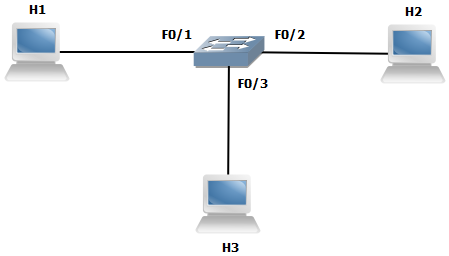
Let us go through the scenario from figure 2.1, when H1 wants to ping H2. Let us assume that H1 knows the MAC address of H2. The Switch is just powered on. The following steps occur.
1. H1 encapsulates the ICMP request packet in a Frame and sends it to the destination MAC address of H2.
2. When the Switch receives the frame from H1 it makes an entry in the MAC table indicating that H1 is connected to interface F0/1.
3. Then the Switch looks for the exit interface for the destination MAC address of H2 in the MAC table.
4. As the Switch finds that it does not have an entry for the MAC address of H2 it floods the frame out of all interfaces except F0/1.
5. The frame is received by both hosts H2 and H3. Both the hosts check the destination address of the frame, then H2 finds that the frame is destined to it.
6. H2 answers with an ICMP reply, by encapsulating the packet in the frame and sends it back to H1.
7. Now the Switch sees that it receives a frame in the interface F0/2 and then immediately maps the MAC address of H2 to interface F0/2 and sends the frame out of F0/1 to H1.
The output 2.1 shows the MAC table of the Switch after H1 got a ping replay from H2
CON Output 2.1 verifying MAC table
Switch>sh mac-address-table
          Mac Address Table
-------------------------------------------

Vlan    Mac Address       Type        Ports
----    -----------       --------    -----
 All    000b.be4a.09c0    STATIC      CPU
 All    0100.0ccc.cccc    STATIC      CPU
 All    0100.0ccc.cccd    STATIC      CPU
 All    0100.0cdd.dddd    STATIC      CPU
   1    0011.1111.1111    DYNAMIC     Fa0/1
   1    0022.2222.2222    DYNAMIC     Fa0/2
Total Mac Addresses for this criterion: 6
Functionality differences between Switch and a Hub:
As you recall, the Hub shares the same Collision Domain and there by functions different than a Switch. Let us take the same scenario where the H1 pings H2 through a Hub instead of a Switch.
1. H1 encapsulates the ICMP request packet in a Frame and sends it to the destination MAC address of H2.
2. The Hub, a layer 1 device does not know of the MAC addresses so it relays the electronic signals (Bits) out of all ports other than the port where it came in.
3. H2 receives the electronic signals and then finds out that the Frame is destined to it, so it answers with an ICMP encapsulated Frame.
4. The electronic signal arriving at the Hub is being relayed out of all the ports except the port connected to H2.
A Switch acts like a hub when the following conditions exist.
1. When the ability to remember MAC addresses is lost. For example the MAC table is full.
2. When it receives an unknown unicast frame. For example when the destination address is not in the MAC table.
3. When it receives a Broadcast frame.
Loop Avoidance STP (IEEE 802.1D):
A loop occurs when a Frame circulates in a redundant network topology forever. This could be caused when a device sends a broadcast frame which results in many more broadcasts and ultimately disrupting the Switch functionality.
There is no mechanism in layer 2 to avoid a frame from indefinitely looping in the network, so the Spanning Tree Protocol (STP) came to handle the situation. STP’s main task is to stop network loops from occurring on your layer 2 devices by vigilantly monitoring the network to find all links, making sure that no loops occur by shutting down any redundant links. STP uses the spanning-tree algorithm (STA) to first create a topology database, then search out and destroy redundant links. With STP running, frames will be forwarded only on the premium, STP-picked links.
Spanning Tree Terms:
Before getting into the details of how STP works in the network, we need to understand some basic terms and how they relate within the layer 2 switched networks.
Bridge Protocol Data Unit (BPDU): Bridges and Switches exchange protocol data units periodically, called BPDUs, that include enough information for them to agree on who is the root bridge, and to decide on the roles and states for their local ports.
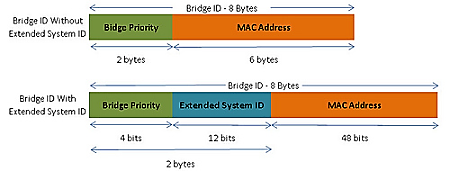
Bridge ID (BID): The Bridge ID is the unique identification of a Switch in the given network. STP uses BID to track all the switches in the network. It is determined by a combination of the Bridge Priority, Extended System ID and the MAC address.
Bridge Priority: The bridge priority is a customizable value used to influence the Root Bridge election. The switch with the lowest priority, which means lowest BID, becomes the Root Bridge (the lower the priority value, the more preferred). To ensure that a specific switch is always the Root Bridge, its priority must be set to a lower value than the rest of the switches in the STP domain. The default value for the priority of all Switches is 32768. The priority range is between 0 and 65536; therefore, 0 is the highest priority.
Extended System ID: The early implementation of STP was designed for networks that did not use VLANs. There was a single common spanning tree across all switches. When VLANs started to become common for network infrastructure segmentation, STP was enhanced to include support for VLANs. As a result, the extended system ID field contains the ID of the VLAN with which the BPDU is associated.
Figure 2.2 Bridge ID structure
Root Bridge: The Root Bridge or Root Switch is the Switch with the best Bridge ID. With STP, the key is for all the switches in the network to elect a root bridge that becomes the focal point in the network.
Non-root Bridge: These are all Switches that are not the Root Bridge. Non-root bridges exchange BPDUs with all Switches and update the STP topology database on all switches to prevent loops and there by maintaining a stable network.
Port cost: Port cost is the cost assigned to a port. The cost of a link is determined by the bandwidth of a link by default. It could also be modified to tweak the STP traffic flow. The following table shows the default cost for various interfaces.
Table 2.1 Default STP port costs
| Interface Speed | Cost |
| 10 Mb/s | 100 |
| 100 Mb/s | 19 |
| 1 Gb/s | 4 |
| 10 Gb/s | 2 |
Root port (RP): Root Port is the port which is connected to the Root Switch. It may or may not be directly connected to the Root Switch. A RP will have the lowest path cost from a given number of redundant paths. A switch will only have one RP. A RP will be connected to a Designated Port.
Designated Port (DP): A Designated Port is one that has been determined as having the best (lowest) cost. A designated port will be a forwarding port. It could be connected to either a RP or NDP.
Non-designated Port (NDP): A Non-designated Port is one with a higher cost than the DP. NDP ports will be blocking user data traffic.
How STP works?
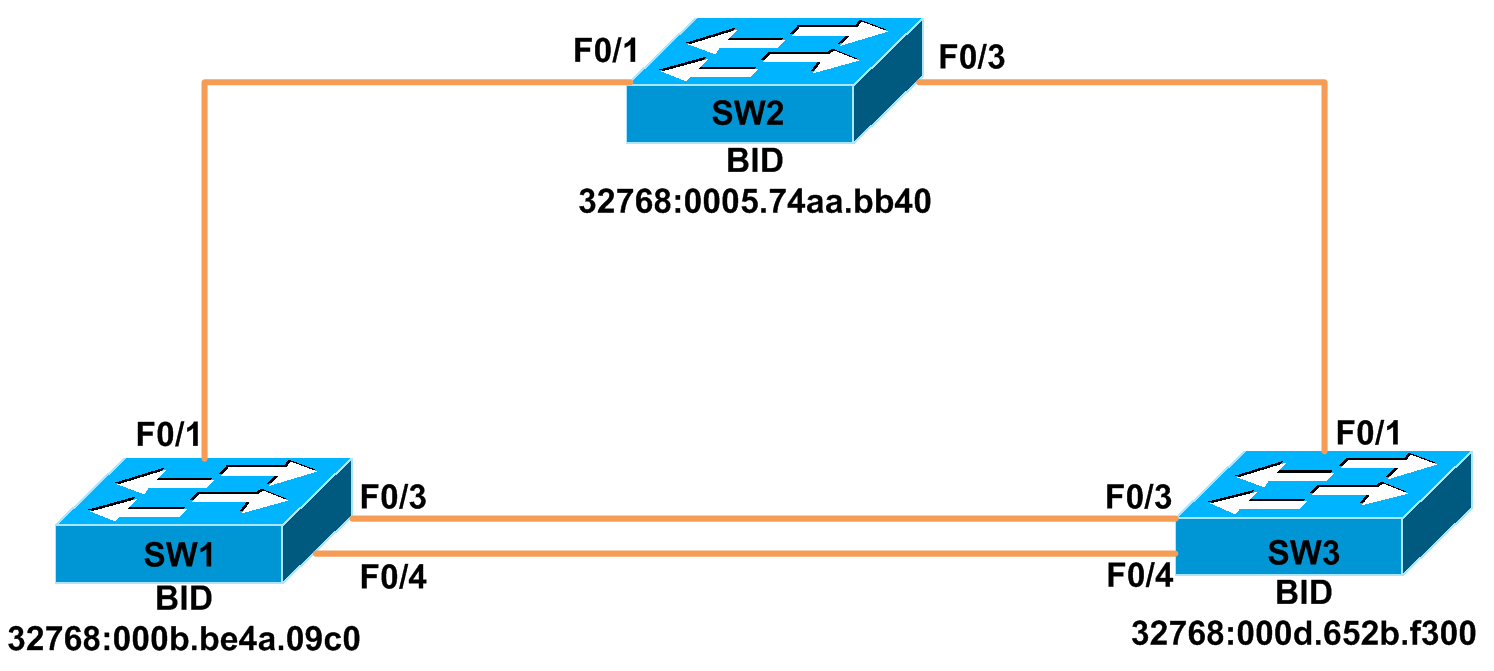
The topology below will be used to explain technologies unless otherwise specified. We have 2 redundant links, one between SW1, SW2 and SW3 and another between SW1 and SW3. The aim of STP is to remove this redundancy by blocking a port for user data traffic.
Figure 2.3 STP topology
The STP has the following steps:
1. Select the Root Bridge.
2. All Non-root Bridges has to find the RP.
3. Block the Non-designated Port.
Root Bridge selection:
The Bridge ID is used to elect the Root Bridge in the STP domain and could also be used to determine the Port roles for each of the remaining devices in the STP domain. This ID is 8 bytes long and includes both the priority and the MAC address of the device. The default priority on all devices running STP is 32,768. So the MAC address is the tiebreaker in determining the Root Bridge. The best BID is the one with the lowest value and the frame which contains the best BID is called Superior BPDU.
Each switch in the broadcast domain initially assumes that it is the Root Bridge, so the BPDU frames sent contain the BID of the local switch as the Root ID. By default, BPDU frames are sent every 2 seconds after a switch is booted. Each switch maintains local information about its own BID, the current Root ID, and the cost to reach the Root Switch.
When the Switch receives a BPDU frame, they compare the Root ID from the BPDU frame with the local Root ID. If the Root ID in the BPDU is lower than the local Root ID (superior BPDU), the switch updates its local Root ID. Then it sends a BPDU frame with the new Root ID which also reflects the updated path cost out of its Designated Ports. Each switch in the spanning tree uses its path costs to identify the best possible path to the root bridge.
Let us assume that SW3 is booted first and then SW1 and finally SW2. The following steps occur as STP converges:
1. SW3 sends a BPDU out of all ports in the same VLAN, claiming that it is the Root.
2. The SW1 receives the BPDU from SW3. SW1 finds out that it has higher priority, and then it sends out its own BPDU to SW3.
3. SW3 learns from this BPDU that SW1 is the Root Switch. It then forwards this BPDU after updating the cost and Root ID out of interface F0/1 which is connected to SW2
4. SW2 realizes from the BPDU that it has a better priority and so it sends out its own BPDU to SW1. SW1 updates the new Root ID.
5. SW1 sends the updated BPDU to SW3, which also updates its Root ID.
CON output 2.2 Verifying the Root Bridge, port states and port roles.
SW2#sh spanning-tree

VLAN0001
  Spanning tree enabled protocol ieee
  Root ID    Priority    32769
             Address     0005.74aa.bb40
             This bridge is the root
             Hello Time   2 sec  Max Age 20 sec  Forward Delay 15 sec

  Bridge ID  Priority    32769  (priority 32768 sys-id-ext 1)
             Address     0005.74aa.bb40
             Hello Time   2 sec  Max Age 20 sec  Forward Delay 15 sec
             Aging Time 300

Interface        Role Sts Cost      Prio.Nbr Type
---------------- ---- --- --------- -------- --------------------------------
Fa0/1            Desg FWD 19        128.1    P2p
Fa0/3            Desg FWD 19        128.3    P2p
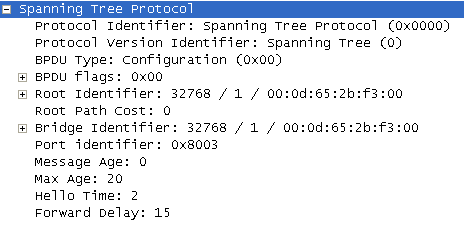
In figure 2.4 is the capture when SW3 boots up and assumes itself as the root. The Root Identifier and the Bridge Identifier are the same and also the cost to Root Switch is zero. You may also notice the default priority and the STP timers.
Figure 2.4 Wireshark capture from Switch 3
Finding Root Port:
The port on which a Switch receives the best BPDU will be the best path to reach the Root. This port will be marked as the Root Port. One Switch will have only one port as Root Port. The Root Port will be attached to a Designated Port. The Root Port will retain its status as long as it receives the best BPDU.
CON output 2.3 Verifying the Root Ports.
SW1#sh spanning-tree root

                                        Root Hello Max Fwd
Vlan                   Root ID          Cost  Time Age Dly  Root Port
---------------- -------------------- ------ ----- --- ---  ----------------
VLAN0001         32769 0005.74aa.bb40     19    2   20  15  Fa0/1

SW3#sh spanning-tree root

                                        Root Hello Max Fwd
Vlan                   Root ID          Cost  Time Age Dly  Root Port
---------------- -------------------- ------ ----- --- ---  ----------------
VLAN0001         32769 0005.74aa.bb40     19    2   20  15  Fa0/1
Blocking the Non-designated Port:
As the best priority switch SW2 is the Root Switch, it is in the center of the STP domain. So a link between SW1 and SW3 must be blocked. Both Switch’s SW1 and SW3 have the same Root path cost of 19. Thus again the MAC addresses are compared because the priorities on both the Switches are same. SW1 having a better BID will have its port in designated and thereby in forwarding mode. The ports on SW3 leading to SW1 will be blocked and it is the Non-designated port.
CON output 2.4 Verifying the interfaces STP status.
SW3#sh spanning-tree interface f0/3

Vlan             Role Sts Cost      Prio.Nbr Type
---------------- ---- --- --------- -------- --------------------------------
VLAN0001         Altn BLK 19        128.3    P2p

SW3#sh spanning-tree interface f0/4

Vlan             Role Sts Cost      Prio.Nbr Type
---------------- ---- --- --------- -------- --------------------------------
VLAN0001         Altn BLK 19        128.4    P2p
Both the ports F0/3 and F0/4 will be blocked because SW3 has higher BID than SW1. The Non-designated ports will remain in blocking mode until they receive a superior BPDU from the Designated Port.
Now let us assume that the F0/1 on SW3 goes down. Then SW3 has 2 ports, F0/3 and F0/4 that connects to the Root over SW1. In the STP BPDU there is an attribute named Port Identifier. When two BPDU’s Root path costs are the same, then the Port ID will be the tie breaker. The BPDU with the lowest Port ID will win. SW3’s interface F0/3 is connected to SW1’s interface F0/3 and interface F0/4 from SW3 to interface F0/4 from SW1. As both the ports from SW3 receive the same Root path cost, it blocks the interface which receives the BPDU with a higher Port ID for data traffic.
Facts of STP:
o The port on which a Non-root Switch receives the superior BPDU will be its Root Port.
o A switch will have only one Root Port.
o A Root port will always be connected to a Designated port.
o Only Designated ports send BPDUs.
o A port will only be blocked if it receives BPDUs from the Designated port.
STP Timers:
Table 2.2 STP timers
| Timer | Description | Default Value |
| Hello | It is the time between each BPDU frame that is sent on a port. | 2 sec |
| Max age | Time to wait before attempting to change the STP topology, if hellos are not received. | 10 consecutive Hellos |
| Forward Delay | Determines how long each of the listening and learning states last before the interface begins forwarding. | 15 sec |
STP Port States:
The ports on a bridge or switch running STP can transition through five different states. I mentioned “can transition” because it could be overridden in some circumstances which will be mentioned later. Each state has its own function in the STP domain.
Blocking: A blocked port won’t forward frames; it just listens to BPDUs. The purpose of the blocking state is to prevent the use of looped paths. All ports are in blocking state by default when the switch is powered up. In this mode the port accepts BPDU’s but does not send them out. The management protocols like CDP are also allowed in this mode.
Listening: A port enters listening state when Spanning-Tree Protocol determines that the port should participate in frame forwarding. At this point, the switch port is not only receiving BPDU frames, it is also transmitting its own BPDU frames and informing adjacent switches that the switch port is preparing to participate in the active topology.
Learning: The switch port listens to BPDUs and learns all the paths in the switched network. A port in learning state populates the MAC address table but doesn’t forward data frames. A port waits for Forward delay to expire to transition a port from listening to learning mode.
Forwarding: The port sends and receives all data frames on the bridged port. If the port is still a designated or root port at the end of the learning state, it enters the forwarding state.
Disabled: A port is in the state of disabled when it is shut down by the administrator. It does not participate in any traffic.
CON output 2.5 Monitoring STP port status.
SW2#debug spanning-tree events
Spanning Tree event debugging is on
*Mar  3 23:06:39: %LINK-3-UPDOWN: Interface FastEthernet0/20, changed state to up
*Mar  3 23:06:40: set portid: VLAN0001 Fa0/20: new port id 8014
*Mar  3 23:06:40: STP: VLAN0001 Fa0/20 -> listening
*Mar  3 23:06:55: STP: VLAN0001 Fa0/20 -> learning
*Mar  3 23:07:10: STP: VLAN0001 Fa0/20 -> forwarding
You can see from the debug output 2.5 the different port states of F0/20 when it comes up. You may notice from the time stamps that it took about 30 sec before the port transitioned to forwarding. This is because of the Forward Delay time of 15 sec for listening and learning.
STP Convergence:
Convergence occurs when all ports on bridges and switches have transitioned to either forwarding or blocking modes. No data will be forwarded until convergence is complete. So it must be made sure that the switched network is physically designed really well so that STP can converge quickly. By creating your physical switch design in a hierarchical manner, the core switch can be made the STP Root, which will then make STP convergence time nice and quick.
When a host boots and requests an IP address, the port where the host is connected to switch must be in forwarding mode that it can receive an IP address from the DHCP server. The switch port will have to wait at least 30 seconds before it can transition to forwarding. This is to prevent loops in a switched network. There are mechanisms to override this like by activating Port Fast or by disabling STP on that port, although disabling STP is not a good idea.
When Port Fast is activated on a port it will transition immediately to forwarding state skipping listening and learning STP states. The Port Fast is activated on the interface where the hosts are connected.
CON output 2.6 Enabling and monitoring STP portfast.
SW1(config-if)#spanning-tree portfast
%Warning: portfast should only be enabled on ports connected to a single
 host. Connecting hubs, concentrators, switches, bridges, etc... to this
 interface  when portfast is enabled, can cause temporary bridging loops.
 Use with CAUTION

%Portfast has been configured on FastEthernet0/8 but will only
 have effect when the interface is in a non-trunking mode.

SW1#debug spanning-tree events
Spanning Tree event debugging is on
*Mar  4 02:19:08: STP: VLAN0001 Fa0/8 ->jump to forwarding from blocking
The output 2.6 shows the port F0/8 directly goes to forwarding from blocking thereby skipping listening and learning state. The port still sends out BPDUs which means that STP is still in operation.
Link Aggregation:
While STP is helps to prevent switching loops, it does not effectively utilize the available bandwidth because a perfect valid path between SW1 and SW3 is prevented from data forwarding. We could literally double the bandwidth available between the two switches if we could use that path that is currently being blocked. The method to use the currently blocked path is by configuring an EtherChannel.
An EtherChannel is simply a logical bundling of 2 – 8 physical connections between two Cisco switches. STP treats the EtherChannel as one physical link. If any of the physical connections inside the EtherChannel go down, STP does not see this, and STP will not recalculate. While traffic flow between the two switches will obviously be slowed, the delay in transmission caused by an STP recalculation is avoided. An EtherChannel also provide redundancy and fault tolerance as each of the aggregated links follows a different physical path.
To aggregate the links Cisco uses a proprietary protocol called Port Aggregation Protocol (PAgP). The open standard is Link Aggregation Control Protocol (LACP). You can also configure the channel without any protocols by simply turning it On. When the On mode is used the negotiation is turned off.
CON output 2.7 Enabling and verifying EtherChannel using PAgP.
SW1(config)#interface range f0/3 – 4
SW1(config-if-range)#channel-group 1 mode desirable

SW3(config)#interface range f0/3 – 4
SW3(config-if-range)#channel-group 1 mode auto

SW1#sh spanning-tree int port-channel 1

Vlan             Role Sts Cost      Prio.Nbr Type
---------------- ---- --- --------- -------- --------------------------------
VLAN0001         Desg FWD 12        128.65   P2p
In the above output 2.7, the EtherChannel is configured using the Cisco proprietary PAgP. In this case the SW1 is negotiating the EtherChannel formation and SW3 is just waiting for the other end to initiate negotiation. As you can see from output 2.7, after configuring EtherChannel the port cost changed to 12 and now both the links F0/3 and F0/4 are used for data transfer.
Rapid STP (IEEE 802.w):
The 802.1D STP standard was designed at a time when the convergence time after a link failure within a minute or so was considered adequate performance. But sooner later the need arise that the layer 2 topology must be converged faster as the advent of very fast L3 protocols like OSPF which provides an alternate path in a very less time.
RSTP introduced new port states and roles to make the convergence much faster. The first three STP port states Disabled, Listening and Learning are now combined to one RSTP port state called Discarding. The other states remain the same. Two new port roles are also introduced. The RP and DP remains, the NDP or the blocking port is now further classified into Alternate and Backup ports. RSTP still uses the timers from STP for backward compatibility. It uses a mechanism called Proposal Agreement sequences between the switches so that it can guarantee to avoid a potential loop.
Command Reference:
Table 2.3 STP configuration and monitoring commands.
| Global config modeSW1(config)# | Purpose |
| spanning-tree vlan 1 priority 4096 | Sets to priority of VLAN 1 to 4096. |
| spanning-tree vlan 1 root primary | Sets the local switch to be the root bridge with a priority of 24,576. If there’s already a bridge out there with 24,576 or less, then the local switch bridge priority is set to 4096 or less. |
| spanning-tree vlan 1 root secondary | Sets the local switch to be the root bridge with a priority of 28,672. |
| Spanning-tree mode rapid-pvst | Will change the mode of STP to rapid spanning tree. |
| No spanning-tree vlan 1-4094 | Disables STP for all VLANs. USE WITH EXTREME CAUTION! |
| Interface config modeSW1(config-if)# | Purpose |
| spanning-tree cost 10 | Will set the cost of 10 for all VLANs. |
| Spanning-tree vlan 1 cost 10 | Will set the cost of 10 for the VLAN 1. |
| spanning-tree port-priority 16 | Will Set the priority of the port to 16 for all VLANs. |
| spanning-tree vlan 1 port-priority 16 | Will set the priority of the port to 16 for the VLAN 1. |
| Spanning-tree portfast | Will enable portfast on the interface. |
| Enable modeSW1# | Purpose |
| sh spanning-tree | Will display STP instances from all VLANS. |
| sh spanning-tree vlan 1 | Will display STP instance from VLAN 1. |
| sh spanning-tree root | Will display the STP Root port. |
| sh spanning-tree int f0/1 | Will display the STP port state and role. |
| debug spanning-tree events | Will display the live output of STP events. |
Table 2.4 EtherChannel configuration and monitoring commands.
| Interface config modeSW1(config-if)# | Purpose |
| channel-group 1 mode on | Enable EtherChannel unconditionally. |
| channel-group 1 mode active | Enable LACP unconditionally. |
| channel-group 1 mode passive | Enable LACP on demand from active device. |
| channel-group 1 mode desirable | Enable PAgP unconditionally. |
| channel-group 1 mode auto | Enable PAgP on demand from desirable device. |
| Enable modeSW1# | Purpose |
| sh etherchannel summary | Displays EtherChannel status. |
| sh etherchannel details | Displays EtherChannel details. |
| sh etherchannel protocol | Displays EtherChannel protocol. |