As link state protocols do not exchange routes, Selective route filtering can be done only on an ABR.
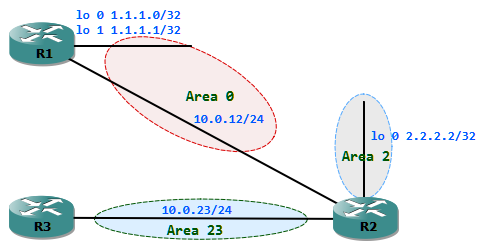
Type 3 LSA filtering can be achieved in 2 different ways. This can be done by using:
- Filter-list
- Summarization
When using filter-list we could choose which routes should be filtered to which area. We could define the source area and the destination area. In the following example the filter-list is used to filter the 1.1.1.1/32 subnet towards area 23.
R2#sh ip ospf database self-originate | begin Area 23

	                Router Link States (Area 23)
Link ID         ADV Router      Age         Seq#       Checksum Link count

	22.22.22.22     R2              324         0x80000005 0x00E547 1
Summary Net Link States (Area 23)
Link ID         ADV Router      Age         Seq#       Checksum

	1.1.1.0         R2              1825        0x80000001 0x003D99

	1.1.1.1         R2              72          0x80000001 0x0033A2

	2.2.2.2         R2              256         0x80000001 0x00A03B

	10.0.12.0       R2              324         0x80000004 0x004A77
Before filtering we could see Type 3 LSA for 1.1.1.1. Now we can filter the LSA as it enters inbound to area 23. For this we first create a prefix list which only denies 1.1.1.1/32.
R2(config)#ip prefix-list A23_FILTER_IN deny 1.1.1.1/32R2(config)#ip prefix-list A23_FILTER_IN permit 0.0.0.0/0 le 32
Now we can apply this prefix list to the OSPF process for the area 23 in inbound direction.
R2(config)#router ospf 1R2(config-router)#area 23 filter-list prefix A23_FILTER_IN inR2#sh ip ospf database self-originate | begin Area 2 Router Link States (Area 2)Link ID ADV Router Age Seq# Checksum Link count22.22.22.22 R2 39 0x80000001 0x00B3C4 1 Summary Net Link States (Area 2)Link ID ADV Router Age Seq# Checksum1.1.1.0 R2 34 0x80000001 0x003D991.1.1.1 R2 34 0x80000001 0x0033A210.0.12.0 R2 34 0x80000001 0x00507410.0.23.0 R2 34 0x80000001 0x00D6E2 Router Link States (Area 23)Link ID ADV Router Age Seq# Checksum Link count22.22.22.22 R2 102 0x80000005 0x00E547 1 Summary Net Link States (Area 23)Link ID ADV Router Age Seq# Checksum1.1.1.0 R2 1603 0x80000001 0x003D992.2.2.2 R2 34 0x80000001 0x00A03B10.0.12.0 R2 102 0x80000004 0x004A77The databse from area 23 does not have 1.1.1.1/32 subnet anymore.
Now we could use the second method to filter which is summarization. With Summarization filtering we cannot influence the destination area to which the LSAs goes to.
R2(config)#router ospf 1R2(config-router)#area 0 range 1.1.1.1 255.255.255.255 not-advertiseR2#sh ip ospf database self-originate | begin Area 2 Router Link States (Area 2)Link ID ADV Router Age Seq# Checksum Link count22.22.22.22 R2 479 0x80000001 0x00B3C4 1 Summary Net Link States (Area 2)Link ID ADV Router Age Seq# Checksum1.1.1.0 R2 475 0x80000001 0x003D9910.0.12.0 R2 475 0x80000001 0x00507410.0.23.0 R2 475 0x80000001 0x00D6E2 Router Link States (Area 23)Link ID ADV Router Age Seq# Checksum Link count22.22.22.22 R2 543 0x80000005 0x00E547 1 Summary Net Link States (Area 23)Link ID ADV Router Age Seq# Checksum1.1.1.0 R2 32 0x80000002 0x003B9A2.2.2.2 R2 475 0x80000001 0x00A03B10.0.12.0 R2 543 0x80000004 0x004A77The summarization method is less preferred as it does not have the granularity to apply filter. Anyway summarization is not mainly used for achieving filtering.