OSPF LSAs could be filtered from the originating router to a specified neighbor. We have the following options
- Using prefix suppression
- Using database filter
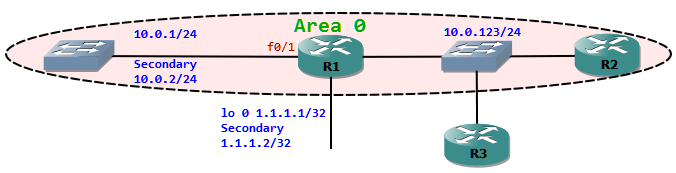
Router 1 has secondary IP address assigned
R1#sh run | begin interfaceinterface Loopback0 ip address 1.1.1.1 255.255.255.255 ip address 1.1.1.2 255.255.255.255 secondary!interface FastEthernet0/1 ip address 10.0.1.1 255.255.255.0 ip address 10.0.2.1 255.255.255.0 secondaryPrefix suppression: This could be enabled globally under the OSPF process or under an interface. This is turned off by default, which means all prefixes are advertised. When this feature is turned on under the OSPF process, the following types of networks are not suppressed.
- Loopbacks
- Secondary address
- Passive interfaces
R1#sh ip ospf database self-originate OSPF Router with ID (11.11.11.11) (Process ID 1) Router Link States (Area 0)Link ID ADV Router Age Seq# Checksum Link count11.11.11.11 11.11.11.11 7 0x80000010 0x009F9D 5
Now let us turn on prefix-suppression on R1 under OSPF.
R1#deb ip ospf lsaR1#deb ip ospf lsa-generationOSPF summary lsa generation debugging is onR1(config)#router ospf 1R1(config-router)#prefix-suppressionOSPF: Suppressing 10.0.1.0/24 on FastEthernet0/1 from router LSA
If the interface is in passive mode the prefix associated with it will not be suppressed.
R1(config-router)#passive-interface f0/1R1(config-router)#do sh ip ospf database self-originate OSPF Router with ID (11.11.11.11) (Process ID 1) Router Link States (Area 0)Link ID ADV Router Age Seq# Checksum Link count11.11.11.11 11.11.11.11 13 0x80000012 0x009B9F 5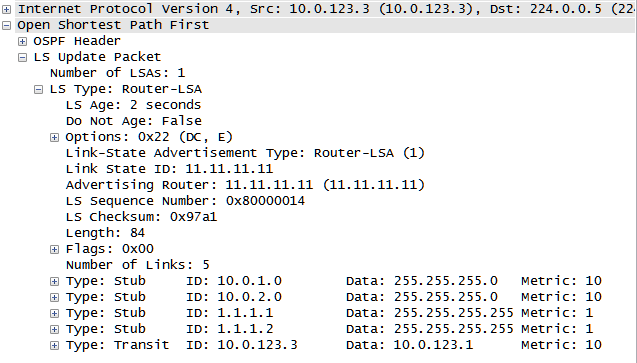
The packet capture show that the network 10.0.1.0/24 associated with f0/1 interface is also sent.
We can configure prefix suppression also directly on an interface, which then only suppresses the specific network. First let us remove the suppression globally and then apply it to the loopback interface.
R1(config)#router ospf 1R1(config-router)#no prefix-suppressionR1(config-router)#int loop 0R1(config-if)#ip ospf prefix-suppressionOSPF: Suppressing 1.1.1.1/32 on Loopback0 from router LSANote that only the primary prefix associated with the interface gets suppressed.
Database filter: This filters all LSAs from being sent to a particular neighbor or out of a specific interface. With this we cannot control which prefixes must be sent. Neighbor command is allowed only on NBMA and point-to-multipoint networks.
As the default network type for OSPF is broadcast, we can only apply database filter to the interface.
R2#sh ip ospf database OSPF Router with ID (22.22.22.22) (Process ID 1) Router Link States (Area 0)Link ID ADV Router Age Seq# Checksum Link count11.11.11.11 11.11.11.11 29 0x80000002 0x00BB8F 522.22.22.22 22.22.22.22 33 0x80000002 0x0089DE 133.33.33.33 33.33.33.33 34 0x80000002 0x0050BE 1 Net Link States (Area 0)Link ID ADV Router Age Seq# Checksum10.0.123.3 33.33.33.33 24 0x80000002 0x00150AR1(config)#int f0/0R1(config-if)#ip ospf database-filter all outR2#sh ip ospf database OSPF Router with ID (22.22.22.22) (Process ID 1) Router Link States (Area 0)Link ID ADV Router Age Seq# Checksum Link count22.22.22.22 22.22.22.22 12 0x80000002 0x0089DE 133.33.33.33 33.33.33.33 13 0x80000002 0x0050BE 1 Net Link States (Area 0)Link ID ADV Router Age Seq# Checksum10.0.123.3 33.33.33.33 13 0x80000001 0x001709As router R1 does not send out any router LSAs out of Fast Ethernet 0/0 interface, R2 does not receive any LSAs from R1. But on the other hand R1 will have all LSAs from other routers. Make sure that the router with database filter applied if never the DR.
To conclude, Prefix suppression would be a preferable method to filter specific LSAs. Database filter could be used when no LSAs are to be sent to a specific router.